

{{imie}} (first name) or {{kod_rabatowy}} (discount code) are filled in from each row. No code or API key needed.
Prepare the file
Export your recipient list from a CRM, shop, or spreadsheet. The first row holds the column headers, and every other row is one card. The easiest start is the template: click Pobierz szablon CSV (Download CSV template) on the first campaign step.customers-spring.csv
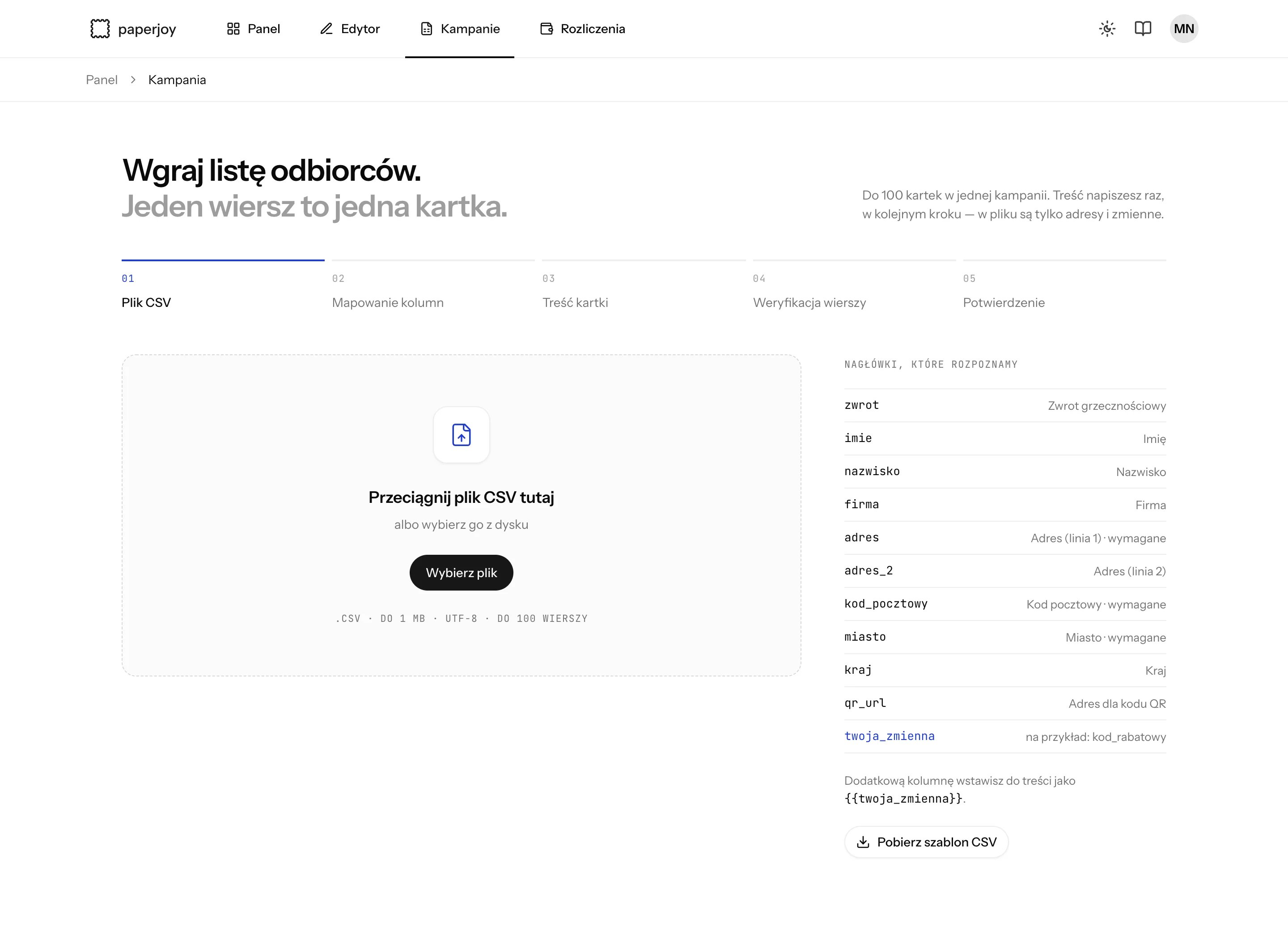
Headers don’t have to match exactly. Case and Polish characters are ignored, and Paperjoy also knows common alternatives, such as
Imię, first_name, Ulica, postal_code, city, or Link QR. Any other column becomes a variable you can use in the message (see below).
The file holds only recipients and variable values. You choose the message, handwriting, and signature in the app, the same for the whole campaign.
File requirements
- A
.csvfile up to 1 MB, with at most 100 data rows and 50 columns. Split a longer list into several campaigns. - Semicolon (
;) or comma (,) separators. Paperjoy detects which one you use. - UTF-8 encoding. Files from older Excel versions (Windows-1250) work too. In Excel, choose Save as → CSV UTF-8.
- Wrap cells that contain a comma, semicolon, or line break in quotes. Empty rows are ignored.
- You can write a Polish postal code without the dash:
00511becomes00-511.
Create a campaign
1
Upload the file
Click Kampanie (Campaigns) in the top menu, or Nowa kampania CSV (New CSV campaign) on the Panel (Dashboard) page. Drop the file on the page or click Wybierz plik (Choose file).
2
Check the column mapping
Paperjoy maps columns to card fields by their headers and shows examples from the first rows. A column without a card field becomes a message variable.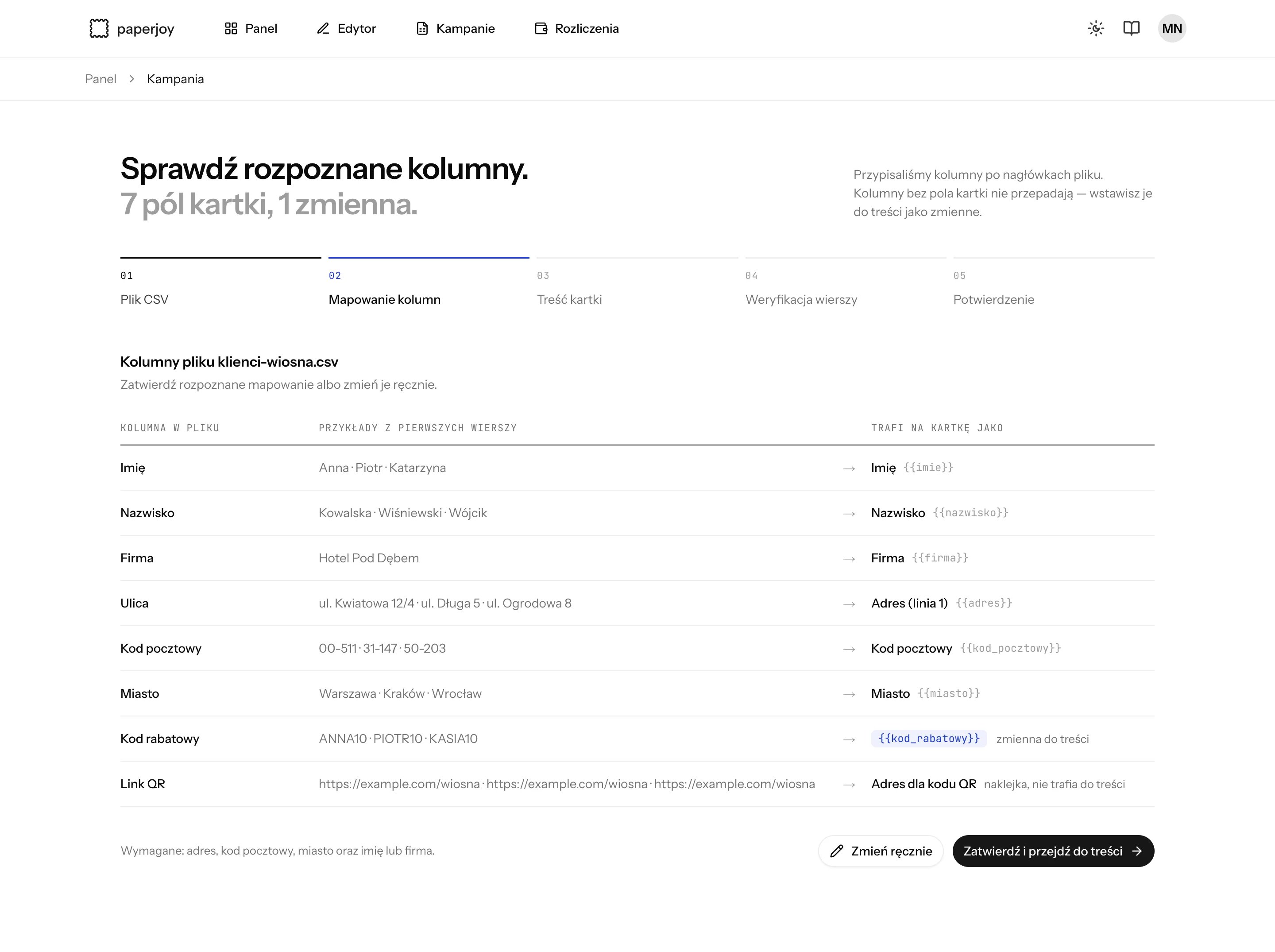
3
Write the message
Write one message for the whole campaign. Click a variable under Treść (Message) to insert it at the cursor. Then choose Profil pisma (Handwriting), Pomyłka (Mistake), and Podpis (Signature): typed or your own.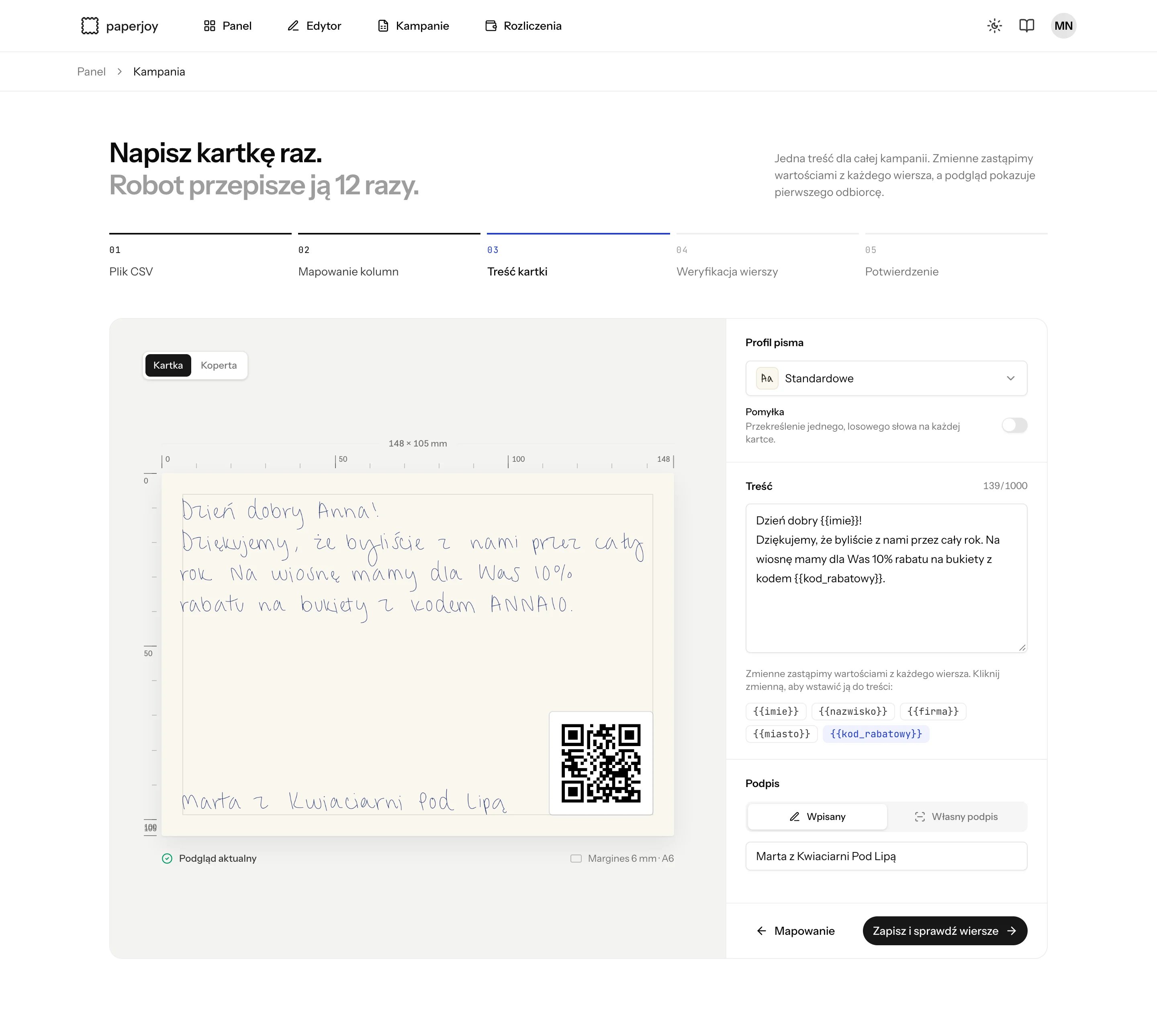
4
Fix or skip rows with errors
Paperjoy checks every row with the same rules as a card from the editor: the address, the text length, and whether the message fits on the card. Fix a row in place with Popraw (Fix), or leave it out with Pomiń (Skip). A skipped row doesn’t become a card, and Przywróć (Restore) brings it back.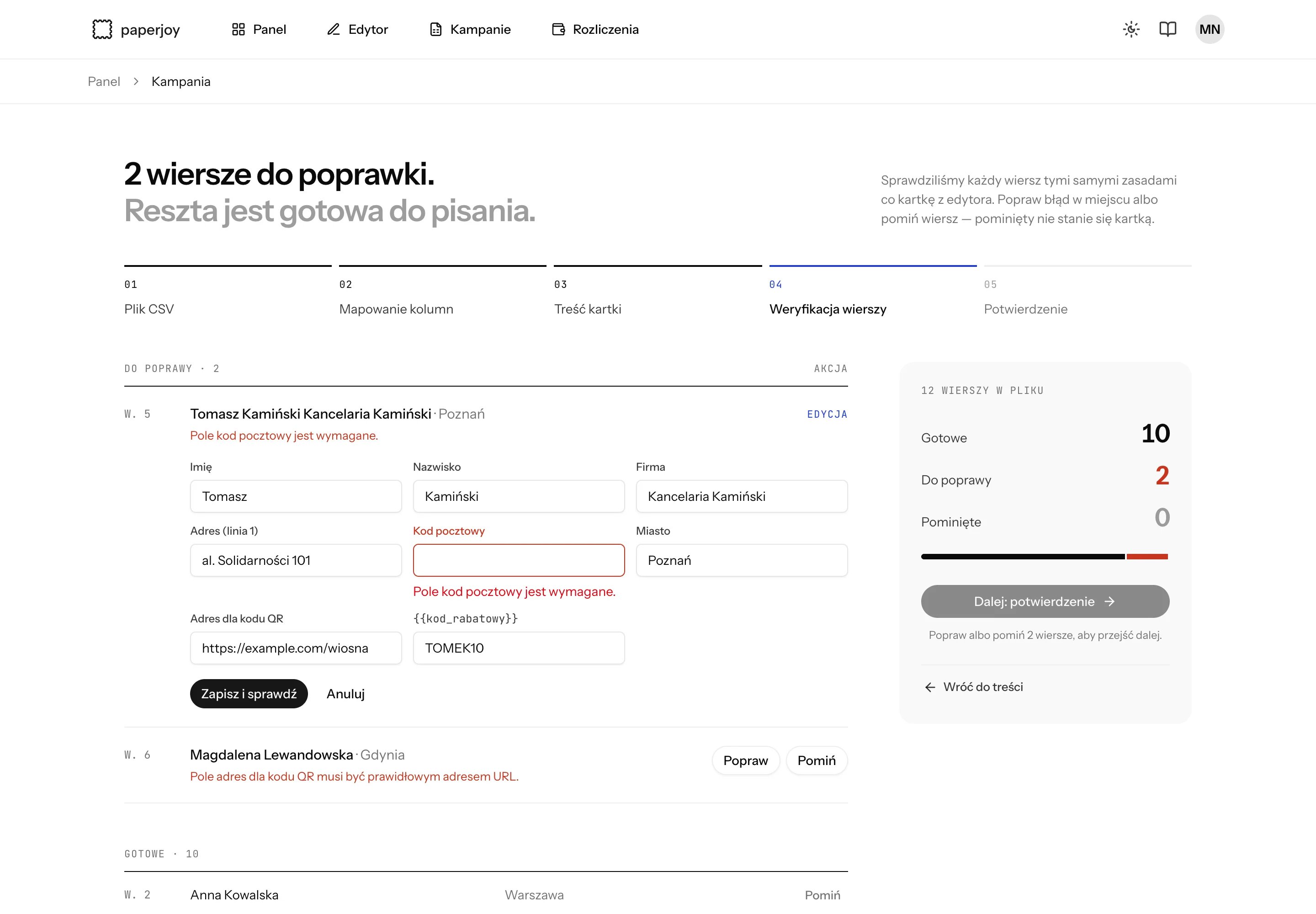
5
Confirm
The last step shows the message, the settings, the number of cards, the cost, and your balance after the campaign. Click Utwórz (Create), e.g. Utwórz 11 kartek (Create 11 cards).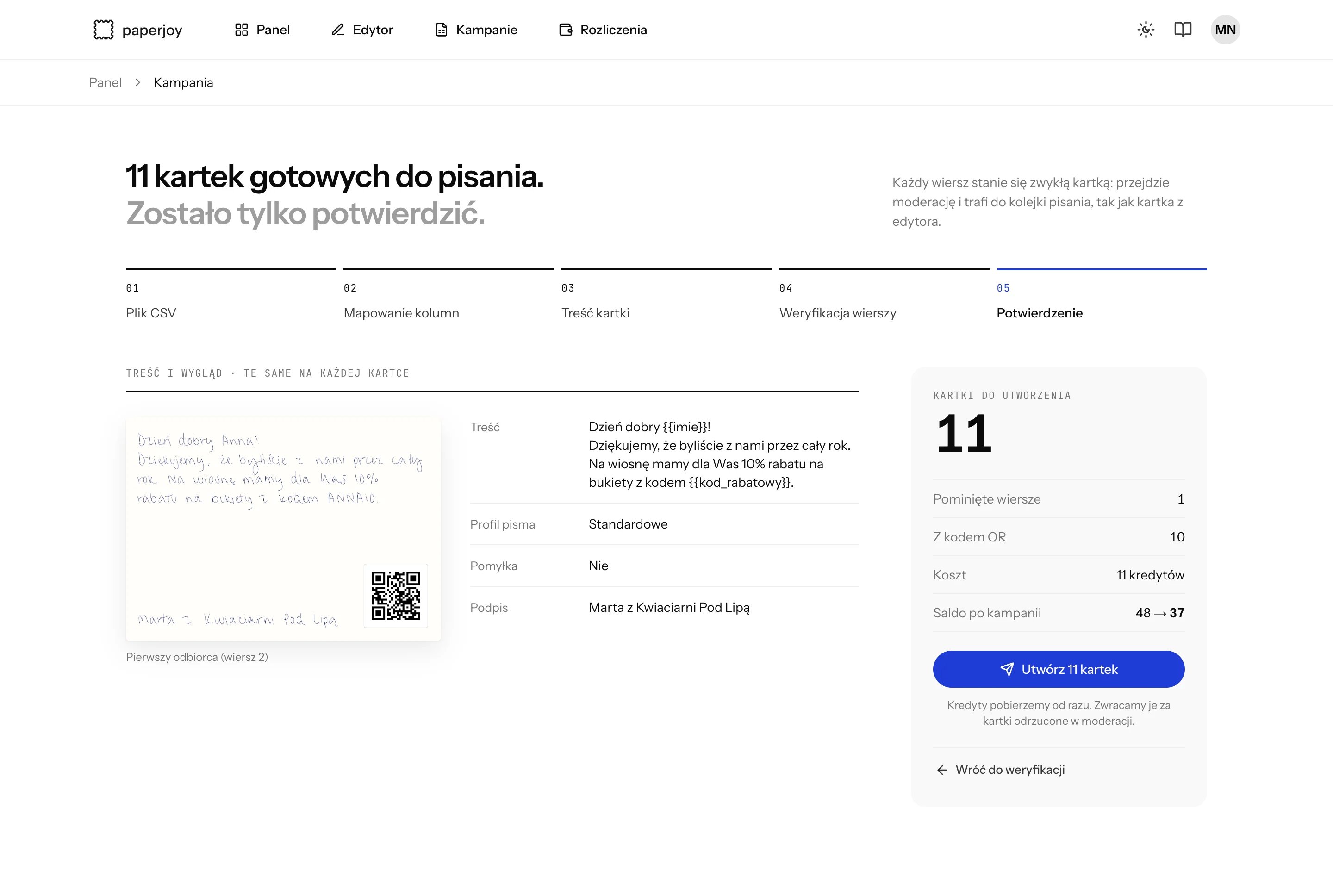
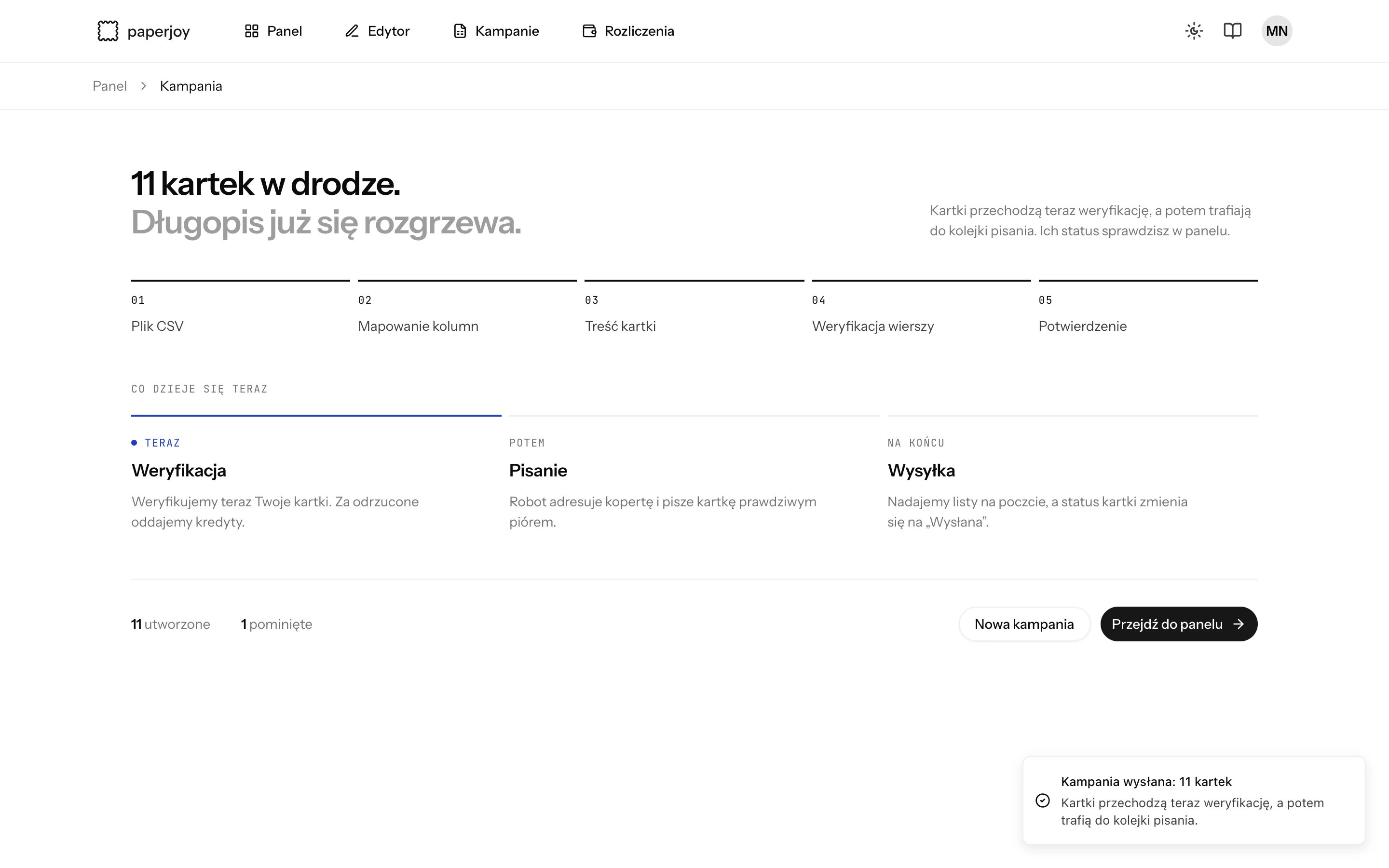
After you confirm, the cards wait for content review.
Variables in the message
A variable is a column name in double curly braces. For each card, Paperjoy replaces it with the value from that row.- A column mapped to a field is named after the header in the table above, such as
{{imie}},{{nazwisko}},{{firma}}, or{{miasto}}, whatever it’s called in your file. The exception isqr_url: the URL goes on the sticker, not into the text. - Any other column is named after its own header in lowercase, without Polish characters, and with spaces replaced by
_. AKod rabatowycolumn is{{kod_rabatowy}}.
- The template can be up to 1,000 characters. With the values filled in, each card must fit in 300 characters and on the card. You’ll see rows that don’t fit in the validation step.
- A variable that isn’t in the file blocks saving. The error lists the available names.
- A row with an empty value for a variable you use is flagged for fixing.
- Case and spaces inside the braces don’t matter:
{{ Imię }}works like{{imie}}.
QR codes in a campaign
Add aqr_url column to give each card a QR code sticker. Each row can point somewhere else, for example a link with its own discount code. An empty cell means a card without a code. The URL must start with http:// or https://.
Each card gets its own code, so the scan statistics show which cards were scanned. The QR code is included in the card’s price.
Cost and limits
- If you don’t have enough credits, the Utwórz (Create) button is disabled. Top up or go back and skip some rows.
- Every card in the campaign counts toward the daily postcard ordering limit. See Errors and rate limits.
- Cards rejected in content review are refunded automatically.
- A campaign creates all of its cards or none. If a row stops passing validation at confirmation, nothing is created or charged, and the campaign goes back to the validation step with the rows flagged.
Come back to a campaign
Paperjoy saves the campaign after every step. You can close the tab and come back later: unfinished campaigns are listed under Niedokończone kampanie (Unfinished campaigns) below the upload area. Campaigns unchanged for 7 days are deleted. The Mapowanie (Mapping), Wróć do treści (Back to message), and Wróć do weryfikacji (Back to validation) buttons go back one step.Campaigns in the API
You create a campaign in the Paperjoy app, but you can read its progress and postcards through the API, for example to record statuses and scans in your CRM after the cards go out. The API never changes a campaign. An API key only sees campaigns in its own mode.
The campaign ID (
cmp_…) is also in the campaign’s address in the Paperjoy app.
page and per_page, and follow links.next. The API never returns the CSV file’s columns or rows, so recipient data is only on the postcards.
Common problems
Polish characters look garbled
Polish characters look garbled
The file uses an unusual encoding. In Excel, save it as CSV UTF-8. From Google Sheets, download it as CSV.
"Wiersz ma więcej kolumn niż nagłówek" (The row has more columns than the header)
"Wiersz ma więcej kolumn niż nagłówek" (The row has more columns than the header)
The row contains a comma or semicolon outside quotes, e.g. in an address like “ul. Długa 5, lok. 2”. Fix the row in the validation step or wrap the cell in quotes in the file.
The file has more than 100 rows
The file has more than 100 rows
Split it into files of up to 100 rows and create a separate campaign from each.
The message doesn't fit on the card
The message doesn't fit on the card
Longer names or variable values make the text longer. Shorten the message or fix the value in the row. A QR code and a custom signature take up room, so the lines next to them are shorter.